vscode配置#
c_cpp_properties.json#
{
    "configurations": [
        {
            "name": "Win32",
            "includePath": [
                "${workspaceFolder}/**"
            ],
            "browse": {
                "path": ["${workspaceFolder}/**"]
            },
            "defines": [
                "_DEBUG",
                "UNICODE",
                "_UNICODE"
            ],
            "cStandard": "c11",
            "cppStandard": "c++14",
            "intelliSenseMode": "windows-gcc-x64",
            "configurationProvider": "${default}",
            "compilerPath": "C:/HighTec/toolchains/tricore/v4.9.3.0-infineon-1.0/bin/tricore-gcc.exe"
        }
    ],
    "version": 4
}
c.json#
{
    // Place your snippets for c here. Each snippet is defined under a snippet name and has a prefix, body and
    // description. The prefix is what is used to trigger the snippet and the body will be expanded and inserted. Possible variables are:
    // $1, $2 for tab stops, $0 for the final cursor position, and ${1:label}, ${2:another} for placeholders. Placeholders with the
    // same ids are connected.
    // Example:
    // "Print to console": {
    //  "prefix": "log",
    //  "body": [
    //      "console.log('$1');",
    //      "$2"
    //  ],
    //  "description": "Log output to console"
    // }
    "change commet": {
        "prefix": "CC",
        "body": [
            "/**",
            "  * @author: czc",
            "  * @date: ${CURRENT_YEAR}-${CURRENT_MONTH}-${CURRENT_DATE} ${CURRENT_HOUR}:${CURRENT_MINUTE}:${CURRENT_SECOND}",
            "  * @description:",
            "  */"
        ],
        "description": ""
    },
    "Hfile Header": {
        "prefix": "hHeader",
        "body": [
            "#ifndef __${TM_FILENAME_BASE}_H__",
            "#define __${TM_FILENAME_BASE}_H__",
            "\n",
            "#endif"
        ]
    },
    "Cfile Header": {
        "prefix": "cHeader",
        "body": [
            "#include \"${TM_FILENAME_BASE}.h\""
        ]
    },
    "MemMap Init": {
        "prefix": "memHeader",
        "body": [
            "#ifdef ${1:example}_START_SEC_${2:example}",
            "#define xx",
            "#include xx",
            "#undef ${1:example}_START_SEC_${2:example}",
            "",
            "#elif defined ${1:example}_STOP_SEC_${2:example}",
            "#define xx",
            "#include xx",
            "#undef ${1:example}_STOP_SEC_${2:example}",
            "",
            "#else",
            "#error \"${TM_FILENAME}, wrong command\"",
            "#endif",
            ""
        ]
    },
    "memBody": {
        "prefix": "memBody",
        "body": [
        "#elif defined ${1:example}_START_SEC_${2:example}",
        "#define xx",
        "#include xx",
        "#undef ${1:example}_START_SEC_${2:example}",
        "",
        "#elif defined ${1:example}_STOP_SEC_${2:example}",
        "#define xx",
        "#include xx",
        "#undef ${1:example}_STOP_SEC_${2:example}",
        ""
        ],
        "description": "memBody"
    }
}
markdown.json#
{
// Place your snippets for markdown here. Each snippet is defined under a snippet name and has a prefix, body and
// description. The prefix is what is used to trigger the snippet and the body will be expanded and inserted. Possible variables are:
// $1, $2 for tab stops, $0 for the final cursor position, and ${1:label}, ${2:another} for placeholders. Placeholders with the
// same ids are connected.
// Example:
// "Print to console": {
// "prefix": "log",
// "body": [
// "console.log('$1');",
// "$2"
// ],
// "description": "Log output to console"
// }
"insert img": {
"prefix": "img",
"body": [
"<div align=\"center\"><img src=\"$1.png\" width = \"500\" alt=\"$2\" /></br>$2</div></br>"
],
"description": "insert img"
},
"tab": {
"prefix": "tab",
"body": [
" "
],
"description": "insert tab"
},
"font green": {
"prefix": "fontG",
"body": [
"<font color=green>$1</font>"
],
"description": ""
},
"font yellow": {
"prefix": "fontY",
"body": [
"<font color=yellow>$1</font>"
],
"description": ""
},
"markdown header style":{
"prefix": "header style",
"body": [
"<style>",
"img{",
"\tmax-height: 60%;",
"\tmax-width: 60%;",
"\tpadding-left: 20%;",
"}",
"table{",
"\twidth: 80%;",
"\tmargin: auto;",
"}",
"</style>",
],
}
}
keybindings.json -- 快捷键#
// 将键绑定放在此文件中以覆盖默认值 auto[]
[
    {
        "key": "alt+i",
        "command": "cursorUp",
        "when": "textInputFocus"
    },
    {
        "key": "up",
        "command": "-cursorUp",
        "when": "textInputFocus"
    },
    {
        "key": "alt+k",
        "command": "cursorDown",
        "when": "textInputFocus"
    },
    {
        "key": "down",
        "command": "-cursorDown",
        "when": "textInputFocus"
    },
    {
        "key": "alt+j",
        "command": "cursorLeft",
        "when": "textInputFocus"
    },
    {
        "key": "left",
        "command": "-cursorLeft",
        "when": "textInputFocus"
    },
    {
        "key": "alt+l",
        "command": "cursorRight",
        "when": "textInputFocus"
    },
    {
        "key": "right",
        "command": "-cursorRight",
        "when": "textInputFocus"
    }
]
restructuredtext.json#
{
    // Place your snippets for restructuredtext here. Each snippet is defined under a snippet name and has a prefix, body and
    // description. The prefix is what is used to trigger the snippet and the body will be expanded and inserted. Possible variables are:
    // $1, $2 for tab stops, $0 for the final cursor position, and ${1:label}, ${2:another} for placeholders. Placeholders with the
    // same ids are connected.
    // Example:
    // "Print to console": {
    //      "prefix": "log",
    //      "body": [
    //              "console.log('$1');",
    //              "$2"
    //      ],
    //      "description": "Log output to console"
    // }
    "header1": {
        "prefix": "header1",
        "body": "#############################################",
    },
    "header2": {
        "prefix": "header2",
        "body": "*********************************************",
    },
    "header3": {
        "prefix": "header3",
        "body": "=============================================",
    },
    "header4": {
        "prefix": "header4",
        "body": "------------------------------------------------",
    },
    "header5": {
        "prefix": "header5",
        "body": ".......................................",
    },
    "header6": {
        "prefix": "header6",
        "body": "~~~~~~~~~~~~~~~~~~~~~~~~~~~~~~~~~~~~~~~",
    },
    "toctree": {
        "prefix": "toctree",
        "body": [
        ".. toctree::",
        "    :numbered:",
        ""
        ],
        "description": "toctree"
    },
    "start": {
        "prefix": "start",
        "body": [
            "${TM_FILENAME_BASE}",
            "######################################",
        ]
    },
    "image": {
        "prefix": "image",
        "body": [
        ".. image:: ${1:path}",
        "    :align: center",
        "    :width: ${2:550}px"
        ],
        "description": "image"
    },
    "figure": {
        "prefix": "figure",
        "body": [
        ".. figure:: ${1:example}",
        "    :align: center",
        "    :figwidth: 550px",
        "",
        "    xx"
        ],
        "description": "figure"
    }
}
vscode_构建任务#
tasks.json
{
    "tasks": [
        {
            "label": "build",
            "type": "shell",
            "command": "make html",
            "args": [
            ],
            "group": "build"
        }
    ],
    "version": "2.0.0"
}
Paste Image插件配置#
插件截图#
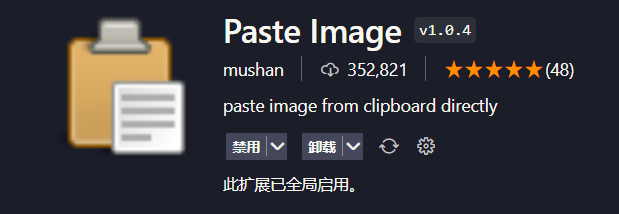
插件截图#
打开用户配置#

打开用户配置#
添加如下代码#
"pasteImage.path": "${currentFileDir}/${currentFileNameWithoutExt}"
最后效果#
会在当前文件目录下创建和当前目录一样名字的文件夹,并将图片放入其中,文件名以日期时间作为编号,如果当时有字符串被选中,则以字符串的名字作为图片名
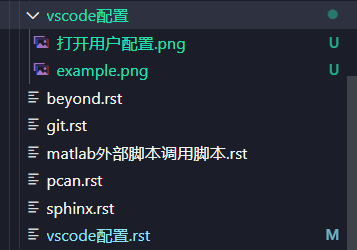
PasteImage插件配置效果#